Tag: product launch

Introducing Audiobook Recaps, a New Way to Reengage With Your Favorite Stories

Today, Spotify is beginning to roll out a powerful new feature designed to help listeners jump back into stories they’ve put down, whether it’s after a busy week or a doze during a bedtime story, or simply needing a quick refresher before diving back in. Introducing audiobook Recaps: short audio summaries tailored to your most recent listening point.

A tool to help great stories be heard . . . and finished

Recaps only cover the portion of the book you’ve already heard. Much like a “previously on” feature for TV, Recaps help you easily reengage with a story without needing to relisten. Designed to reduce friction and keep you immersed, Recaps are part of our ongoing effort to make audiobook listening more seamless, intuitive, and listener friendly.

J.H. Markert, author of Spider to the Fly, described Recaps as “an audio bookmark that speaks,” adding, “Using it once blew my mind. As sophisticated as it is smart, this feature is a must for any audiobook lovers out there.” 

How Recaps work 

Developed in collaboration with our publishing partners, Recaps reflect Spotify’s commitment to helping more stories get heard and giving authors new ways to engage listeners. Here’s how the feature works:

    • When you return to a story, tap the Recap button at the top of an audiobook’s page to hear a tailored summary of what’s happened so far.
    • Your first Recap will be available after you’ve listened to the first 15-20 minutes of a book. After that, they’re regularly updated to match your progress, helping you rejoin a story without spoilers or full book summaries. 
    • Recaps use AI technology to help you catch up, but the work of authors and narrators stays protected: We are not using audiobook content for LLM training purposes or voice generation, and Recaps do not replicate narration or replace the original audiobook in any way.

Recaps are currently in beta, available on iOS for a limited selection of English-language titles, with plans to expand over time. As with many of our features, we’re taking a feedback-driven approach and will continue to iterate and enhance Recaps as we learn.

We see endless potential to reimagine how people engage with books and believe Recaps will help more listeners finish the books they start, turning casual listeners into consistent audiobook fans and deepening the connection between authors and their audiences. We’ll continue investing in technology that makes Spotify more dynamic for booklovers, authors, and publishers alike.

Spotify Updates Shuffle to Keep Your Playlists Feeling Fresh

This year, Spotify has introduced even more ways for users to take control of their listening experience. Whether you’re refreshing your Discover Weekly with genre deep dives, excluding specific songs from your Taste Profile, or using the Snooze feature, these updates make it easier to listen the way you want.

We’ve also been making improvements to Shuffle. Premium users can toggle off Smart Shuffle, and both Free and Premium users can tap any song while shuffling to play it next without reshuffling the queue. We’ve also updated our default Shuffle so you’ll get Fewer Repeats when you listen. This version takes your recent listening into account, so songs you heard recently are less likely to repeat soon, helping your playlists stay fresh and surprising.

Premium users who prefer our previous version of Shuffle can switch to Standard Shuffle in their settings. Just remember: More randomness in your playlist can mean hearing the same tracks more often. That’s why we recommend sticking with the Fewer Repeats default, which is designed to keep your listening experience more varied and engaging.

How to adjust your Shuffle settings

Premium users’ Shuffle will be set to Fewer Repeats, but if you’d like to switch back to Standard Shuffle, you can follow these steps:

    1. Go to your Spotify Settings.
    2. Select Playback.
    3. Choose your preferred Shuffle mode: Fewer Repeats or Standard.

We’re always working to improve Shuffle so you have the best possible listening experience, helping you discover more music, enjoy more variety, and get the most out of every playlist.

Search and Follow Your Favorite Venues on Spotify

In March, we launched Concerts Near You to help listeners find concerts from their favorite artists. Since then, more than 3 million people have used it to discover nearby events. But great live music isn’t just about the artist you see—it’s also about where you see them.

Starting today, Spotify listeners (Free and Premium) can follow their favorite venues, discover new spots nearby, and explore upcoming lineups, all without leaving the app. Plus, the Live Events feed now has a fresh new look, with smarter recommendations and daily updates that make finding the next concert easier and more personal than ever.

A concert feed that’s always in tune

While Concerts Near You updates weekly, the new Live Events feed refreshes daily, surfacing the most relevant concerts in each listener’s area, from this weekend’s intimate gigs to just-announced global tours. It brings together what listeners are streaming, where they live, and the genres they love, all in one personalized destination. When a listener follows a venue, it’s saved to their Library and easy to find, alongside tailored suggestions for other venues they might enjoy.

A new stage for live music, right inside Spotify

Once listeners find a concert they’re interested in, they can just tap through to the event’s official ticketing partner to complete their purchase. They’ll receive a confirmation with all the event details and can return to Spotify anytime to revisit the event page or explore more concerts. With more than 20,000 venues listed worldwide, from iconic arenas to beloved independent clubs, Spotify is helping fans connect to live music wherever they are.

Fueling your city’s music scene 

Live music is the heartbeat of every community. It’s what brings people together and keeps local culture thriving. From historic theaters to basement stages, these are the places where artists grow, fans unite, and lifelong memories take shape. By following your favorite venues on Spotify, you’re not just discovering upcoming shows, you’re supporting the spaces that make live music possible.

So whether it’s catching a set at Brooklyn Paramount in New York, an unforgettable night at Bataclan in Paris, or a live performance at Oxford Art Factory in Sydney, your next great concert experience is just a tap away—right inside Spotify.

Ferramenta de arte da capa de playlists do Spotify chega ao Brasil com uma noite de autoexpressão

Música e arte se uniram em uma noite especial na semana passada na ZIV Gallery, um icônico espaço de arte em São Paulo. O motivo? O lançamento do recurso de personalização de artes de capas de playlists do Spotify no Brasil, que permite aos usuários soltarem a criatividade diretamente no app.

No coração do Beco do Batman — conhecido por sua vibrante cena de arte de rua — 25 criadores de conteúdo de diferentes comunidades se reuniram para celebrar. Rodrigo Azevedo, Head de Editorial do Spotify, abriu a noite com uma apresentação da nova ferramenta criativa, além de outros recursos como o botão Mixar, dando o tom de uma noite dedicada à criatividade e expressão.

“No Spotify, acreditamos que ouvir música é uma forma de autoexpressão. Com ferramentas como as capas de playlist personalizáveis, estamos oferecendo às pessoas ainda mais maneiras de deixar o aplicativo com a sua cara — tanto musicalmente quanto visualmente”, disse Rodrigo. “A inspiração pode vir de qualquer lugar, e um espaço que respira arte e música, como o Beco do Batman, mostra perfeitamente como esses dois mundos se conectam naturalmente.”

Em seguida, os convidados participaram de um tour guiado pelo Beco do Batman, conduzido pelos artistas locais Thiago Carlini e Rodrigo KK, explorando como o grafite e o hip-hop há muito tempo se influenciam mutuamente e moldam a interseção entre arte e música.

De volta à galeria, a criatividade continuou. Munidos de tinta spray, os criadores de conteúdo colocaram seu toque pessoal em um mural coletivo, além de personalizarem as capas de playlists inspiradas pelo passeio. Cada capa foi impressa e transformada em um chaveiro de acrílico, com pingentes que adicionavam uma camada extra de estilo pessoal.

Music Videos in Beta Brings an Improved Viewing Experience to New Markets

Earlier this year, Spotify introduced music videos in beta, giving Premium subscribers in 12 markets another way to connect with the songs and artists they love. Today we are starting to roll out that offering across 85 additional markets, giving even more Premium subscribers the opportunity to dive into the visual worlds of artists like Charli xcx, LISA, Fontaines D.C., Nick Ward, Anirudh Ravichander, and Fireboy DML

Music videos are a powerful way to build connections between artists and fans. In fact, users who discover a song and then watch the music video on Spotify are 34% more likely on average to stream the song again the following week.* And on average, songs discovered with music videos are 24% more likely to be saved or shared in the following week by those who watched. 

Music videos help immerse fans in the experience—whether they’re listening to a new song or revisiting an old favorite. As part of this expansion, Spotify is also adding new features to make the music videos in beta experience even better. These include:

    • Fans can easily find and discover new music videos to watch (on mobile and desktop) with video indicators on tracks.
    • Users can also more easily find the music video they’re looking for alongside its related track by typing the track or artist into search.

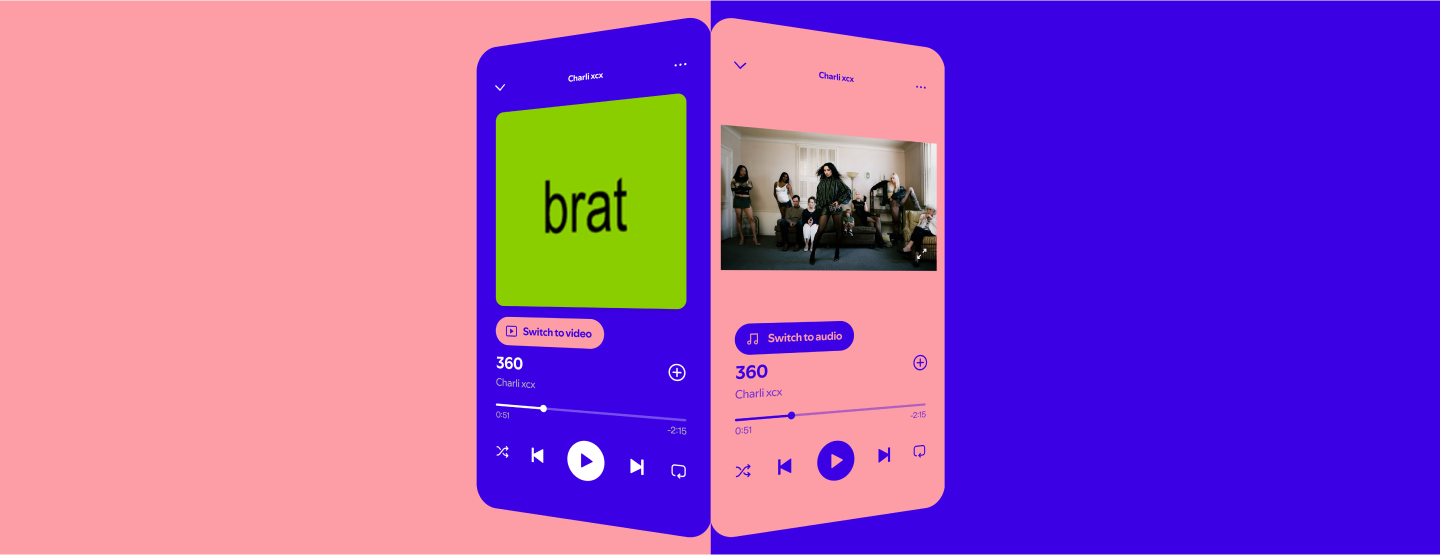
In addition, users will now have the option to seamlessly switch between music tracks and videos with a single tap of a button (on mobile and desktop).

Want to give it a try? Here’s how it works:

    • If you’re a Premium subscriber in one of our 97 beta markets, open Spotify on your iOS, Android, desktop, or TV device and tap the “Switch to video” button for music tracks with video. 
    • The music video will start playing within the Now Playing view, picking up right where you left off.
    • If you want to return to background listening, simply press “Switch to audio” to head back to the music track.
    • You can even watch the music video in full screen by turning your mobile device to watch in landscape mode.

The beta version of music videos on Spotify is starting to roll out in new markets today with a limited catalog of music videos—and will continue rolling out over the next few weeks. We’re always working to build lasting connections between artists and fans, adding features like Countdown Pages, Canvas, Clips from your artists, Artist Profiles, Live Events, and Merch to deliver a rich music listening experience. And for Premium subscribers, music videos in beta—along with offerings like DJ, Jam, and AI Playlist—is yet another way we’re making that experience even richer. 

Stay tuned, as we hope to expand the catalog of music videos, share new places for you to watch them, and take the feature to more users and markets.

*Than users who discover the song but do not watch the music video.